 Switchmast
Twilio error codes, explained
What the codes in your Twilio logs mean and what to do about them. Each explanation comes from Twilio's own error reference (twilio.com/docs/api/errors), read 27 November 2026.
Message delivery
Carrier errors: Twilio accepted the message, but it didn't reach the phone. The message ends as undelivered or failed.
30007 Message filtered
Twilio or the carrier blocked the message as spam. Check registration, consent and content.
30003 Unreachable handset
Phone off, out of signal, roaming, or can't take SMS.
30008 Unknown error
A generic carrier failure with no detail. What to check before contacting support.
30005 Unknown destination handset
The number is unknown to the carrier and may no longer exist.
30006 Landline or unreachable carrier
Usually a landline, or a short code that can't reach the carrier.
30004 Message blocked
The destination number is blocked from receiving the message.
30001 Queue overflow
You sent faster than the sender can go; queued messages fail after 10 hours.
30044 Trial message length exceeded
A trial account sent a message too long for its segment limit.
Sending: numbers, permissions and opt-outs
Twilio refuses these when you send, before any carrier is involved.
21211 Invalid 'To' phone number
Not a valid number, or not in E.164 (+ and country code).
21614 'To' is not a valid mobile number
Probably a landline or an invalid number.
21606 'From' is not a valid message-capable number
The sender isn't yours or can't send messages.
21408 Permissions disabled for the region
Messaging Geo Permissions don't allow that country.
21610 Unsubscribed recipient
The person replied STOP. Only they can opt back in, with START.
10DLC and toll-free
30034 Unregistered 10DLC number
The number isn't on an approved A2P 10DLC campaign, so US texts are blocked.
Campaign rejected
Codes 30880 to 30960: why campaigns fail vetting, which you can fix, and how to resubmit.
Toll-free rejected
Codes 30437 to 30531: why toll-free verification fails and how to resubmit.
| Code | Name | What it means |
|---|---|---|
| 30035 | Message from a number still being configured | The number is pending registration or deregistration for a campaign. Allow up to 24 hours; don't remove and re-add it. |
| 30022 | US A2P 10DLC rate limits exceeded | You sent faster than your campaign's throughput allows. |
| 30023 | Daily message cap reached | Your brand hit its daily limit to a carrier, set by its Trust Score. See 10DLC limits. |
| 30032 | Toll-free number has not been verified | A toll-free number texted a US or Canadian mobile before verification was approved. |
Account and API
Credentials and limits; how keys and tokens work is in Twilio API keys.
20003 Permission denied
Wrong, deleted or wrongly scoped credentials, such as a rotated Auth Token.
20429 Too many requests
Too many concurrent API requests. Back off and retry.
30002 Account suspended
The account was suspended, often for a negative balance, before the message went out.
Webhooks
| Code | Name | What it means |
|---|---|---|
| 11205 | HTTP connection failure | No connection within 10 seconds; Twilio waits 15 seconds in all for a response. See 11200. |
| 12100 | Document parse failure | Your server answered, but the TwiML couldn't be parsed. |
Voice
WhatsApp and Verify
| Code | In short | What it means |
|---|---|---|
| 63015 | Recipient not in your sandbox | The recipient hasn't joined your WhatsApp Sandbox, or joined more than three days ago. See WhatsApp on Twilio. |
| 63016 | Outside messaging window | A free-form WhatsApp message sent more than 24 hours after the customer's last message. Send an approved template with ContentSid. |
| 60202 | Max check attempts reached | 5 wrong code checks on one verification. Wait for it to expire (10 minutes). See Twilio Verify. |
| 60203 | Max send attempts reached | 5 sends without completing a check. |
| 60410 | Verification delivery attempt blocked | Fraud Guard blocked the destination prefix for 12 hours as likely SMS pumping. |
Finding the error on a message
Every message in Twilio has a status (queued, sent, delivered, undelivered, failed and others) and, when it goes wrong, an error_code. You see it in the Console under Monitor › Logs › Messaging, on the Message resource in the API, and in the ErrorCode parameter of your status callback. Webhook and configuration problems (like 11200) appear in the Console's Debugger (Monitor › Debugger) as alerts.
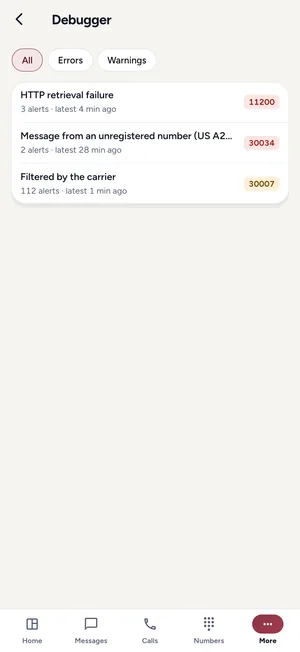
Switchmast puts both in one place on your phone: failed messages in the log, and Debugger alerts grouped by code with how many and how recent. Each code is explained in plain English, offline, with a link to Twilio's reference page.