 Switchmast
Toll-free verification on Twilio
Updated
Toll-free verification is the check US and Canadian carriers require before a toll-free number can send business texts. In Twilio you need an approved Trust Hub profile, then submit the business details, use case, sample message, opt-in proof and expected volume for each number. Twilio says it reviews requests within three business days.
Before you start
- A paid (upgraded) Twilio account; trial accounts can't submit.
- An approved Primary Customer Profile (or Secondary for ISV customers) in Trust Hub. Twilio asks for it before you buy a toll-free number.
- A toll-free number, bought or ported. It costs $2.15 a month in the US (Twilio's SMS pricing page, 27 November 2026); see phone number pricing.
- Political organizations (527s) need a Campaign Verify token.
What you submit
| Field | What Twilio wants |
|---|---|
| Business name, website, type | The legal business and a working website; type is private or public for-profit, sole proprietor, nonprofit or government |
| Business registration number | Required for every business type except sole proprietor, with the registration authority and country (for a US company, usually its EIN) |
| Notification email | Where status updates go |
| Use case categories and summary | What you send and why, in plain words (two-factor, account notifications, delivery notifications, marketing and others) |
| Production message sample | A real message as recipients will see it |
| Opt-in type and opt-in image URLs | How people agree (verbal, web form, paper form, text, QR code, import), with publicly hosted screenshots |
| Message volume | Expected monthly volume |
| Optional but useful | Privacy policy and terms URLs, opt-in confirmation message, help message sample, opt-in keywords, DBA name, age-gated flag |
Steps in the Console
- Set up the Primary Customer Profile in Trust Hub.
- Go to Communications › Numbers & senders, open the Phone Numbers tab and click Set up a new phone number. Choose Business / Nonprofit / Sole Proprietor to see toll-free numbers, then select and purchase one. The full monthly price is charged once the number is provisioned.
- Open the number and complete Finish setting up your number: business and contact details, then the messaging use case.
- Track progress under Trust Hub › Registrations. In the legacy Console it's the number's Regulatory Information tab.
Statuses
| Status | Meaning | Texting to US/Canada mobiles |
|---|---|---|
| Not verified (Restricted) | Twilio's systems are processing the request | Blocked (30032) |
| Verification in progress (Pending) | In the verification team's queue | Blocked (30032) |
| Approved | Verified | Sends |
| Rejected | Not approved | Blocked; fix and resubmit |
Messages from an unverified toll-free number to US or Canadian mobiles fail with error 30032 (toll-free number has not been verified). Twilio's error reference says traffic in Restricted or Pending status has been blocked since 31 January 2024.
Common rejection codes
Every rejection reason has its own code in Twilio's error reference (30437 to 30531). The ones that come up most, and the fix:
| Code | Reason | Fix |
|---|---|---|
| 30445, 30472 | Couldn't validate or verify the business | Business name, registration number and address exactly as registered |
| 30473, 30489, 30491 | Website can't be validated, isn't active, or needs a login | A public, working site that names the business |
| 30476, 30515 | Opt-in not provided | Publicly hosted screenshots of every opt-in path |
| 30446, 30513 | Opt-in not sufficient: express consent, clear language | Wording that says who will text, about what, and how often |
| 30508, 30505 | Pre-ticked box, or opt-in required to use the service | Unticked, optional consent |
| 30475 | Consent bundled with other agreements | A separate SMS consent, not buried in general terms |
| 30496, 30499 | Use case, summary and message content don't agree | Make the sample and summary match the categories you chose |
| 30449, 30525 | URL problems or public shorteners in the sample | Full links on your own domain |
| 30527 | Business registration number missing or invalid | The right number and authority (EIN for US companies) |
| 30441–30469 | Disallowed content (sex, hate, alcohol, firearms, tobacco, cannabis, gambling, crypto, debt and lending and others) | Usually not resubmittable |
Resubmitting
- Go to Trust Hub › Registrations and choose Edit & resubmit on the rejected request (legacy Console: the number's Regulatory Information tab, Make corrections and resubmit, which shows the days left).
- Fix the fields behind the rejection code and send it again. Within seven days it goes to a priority queue. Through the API,
edit_allowedsays whether you can edit andedit_expirationis the deadline, seven days from the initial request. - If the rejection says "not eligible for resubmission", deleting the request and submitting a new one is the only way. A deleted and recreated request goes to the back of the queue, so don't delete one you could resubmit.
Deleting a verification doesn't release the number; releasing the number deletes its verification.
Toll-free vs 10DLC
| Toll-free | 10DLC (local numbers) | |
|---|---|---|
| Registration | One verification per number | Brand + campaign at The Campaign Registry |
| Fees (US) | No separate verification fee listed | Brand fee, $15 vetting per campaign, monthly campaign fee |
| Number price (US, 27 Nov 2026) | $2.15/month | $1.15/month |
| Message price (US, 27 Nov 2026) | $0.0083 per SMS segment plus carrier fees, the same for both | |
| Review time | Within three business days (after the profile) | Under one week for campaign approval (Twilio's estimate) |
| Looks like | An 8XX number | A local number with your area code |
Details on the 10DLC route: A2P 10DLC registration. For one-time passcodes, Twilio Verify needs neither.
Watch the status from your phone
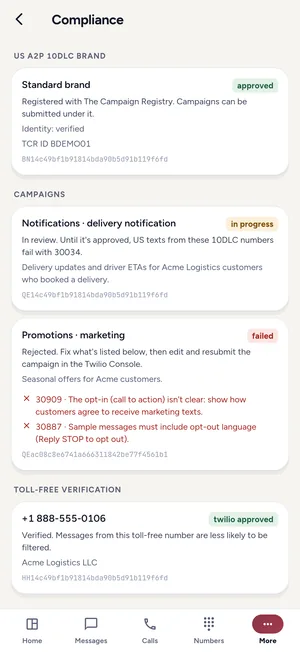
Switchmast's Compliance screen lists each toll-free verification with its status and rejection reason next to your 10DLC brand and campaigns, so you know the moment a number is approved or needs a fix.
Questions
How long does Twilio toll-free verification take?
Twilio's API docs say it reviews toll-free verification requests within three business days. Your Trust Hub Primary Customer Profile must be approved first, which can take longer.
Is there a fee for toll-free verification?
Twilio's verification docs list no separate verification fee. You pay the toll-free number's monthly price ($2.15 in the US on Twilio's SMS pricing page as of 27 Nov 2026) and the usual per-message prices and carrier fees.
Can I send texts before my toll-free number is verified?
No. Since 31 January 2024, messages from toll-free numbers in Restricted or Pending status to US or Canadian mobiles are blocked and fail with error 30032 until verification is approved.
What happens if verification is rejected?
If the rejection allows edits, fix the flagged fields and resubmit within seven days for priority review. After that the number stays Restricted until you resubmit. If Twilio marks it not eligible for resubmission, deleting the request and submitting a new one is the only way.
Toll-free or 10DLC: which should I use?
Toll-free needs one verification per number and no brand or campaign fees. 10DLC uses local numbers and needs brand and campaign registration with one-time and monthly fees. Both are business texting routes with their own throughput limits.
Why was my toll-free verification rejected?
Each rejection carries a code from 30437 to 30531 in Twilio's error reference. The common ones are an unverifiable business or website, an opt-in that isn't shown or is pre-ticked, a sample that doesn't match the use case, public URL shorteners, and disallowed content.
Sources
All read 27 November 2026.
- Twilio docs: Toll-free verification in the Console (steps, statuses, resubmitting, deleting)
- Twilio docs: Toll-free verification API onboarding (fields, review time, edit_expiration)
- Twilio docs: Error 30032 and the error reference (rejection codes 30437 to 30531)
- Twilio: SMS pricing, United States
- Twilio: 10DLC