 Switchmast
Twilio error 30007: message filtered
Updated
30007 (Message filtered) means Twilio's spam filter or the recipient's carrier blocked your message. It usually points to an unregistered or mismatched sender, missing consent, or content that looks like spam or phishing. Check your 10DLC or toll-free registration first, then the message content; if traffic is compliant, send Twilio Support three failed Message SIDs.
What Twilio says it means
Twilio's error reference names 30007 Message filtered, log type CARRIER, level ERROR. The two causes it lists:
- Twilio's message filtering system identified the message as spam or unwanted messaging. Twilio filters for breaches of its Messaging Policy and Acceptable Use Policy: spam, phishing and fraud.
- A wireless carrier flagged the message as objectionable and blocked it. Carriers filter abusive traffic and enforce their own rules on what may be sent to their network or country.
The message is not delivered. Its status becomes undelivered, with error code 30007 on the Message resource (error_code), in your status callback (ErrorCode) and in the Console under Monitor › Logs › Messaging.
Check these, in order
- Is the sender registered? A US 10DLC number must be on an approved A2P 10DLC campaign (unregistered numbers get 30034 instead). A toll-free number must be verified; unverified ones get 30032.
- Does the message match the registered use case? A campaign registered for account notifications that sends promotions is a classic trigger.
- Did every recipient opt in? Bought or scraped lists draw complaints and filtering.
- Links: public shorteners such as bit.ly are treated as risky; use your own domain. Twilio's 10DLC vetting rejects campaigns with public shorteners in sample messages for the same reason.
- Content: anything that reads like phishing (urgent account warnings with a link), or content restricted by carriers, is filtered more often.
- Pattern: a sudden spike in volume, or the same text to many numbers from a new sender, attracts filters.
- Policy: read Twilio's Messaging Policy and Acceptable Use Policy against what you send.
A worked example
A delivery company registers a 10DLC campaign for "delivery notifications". Its texts read "Your parcel arrives today between 2 and 4pm. Track: acme.example/t/8KD2". They deliver. Marketing then adds a weekly line to the same Messaging Service: "FLASH SALE 50% off, today only! bit.ly/xyz". Those messages start failing with 30007.
Three things changed at once: the content no longer matches the registered use case, it uses a public shortener, and it reads like a promotion sent to people who agreed to delivery updates. The fix is a separate marketing campaign (with its own opt-in), links on the company's own domain, and the promotion sent only to people who agreed to marketing texts.
Common mistakes
- Retrying the same message. Filtering is not a network glitch. Sending the same text again usually gets the same result and adds to the pattern filters look for.
- Swapping numbers. Moving the same traffic to a fresh number doesn't fix the content or the consent, and unregistered numbers are blocked outright.
- Reading 30007 as an opt-out. Opt-outs are 21610. Recipients who never asked for your texts are a cause of filtering, not the same error.
- Confusing it with 30004. 30004 (Message blocked) means the destination number is blocked from receiving the message; 30007 is about your traffic.
Getting help from Twilio
If you believe your messages comply with Twilio's and the carriers' policies, Twilio asks you to collect three or more Message SIDs with status undelivered and error 30007 and open a support ticket. Support reviews the traffic and brings in its Compliance team where needed.
How Switchmast helps
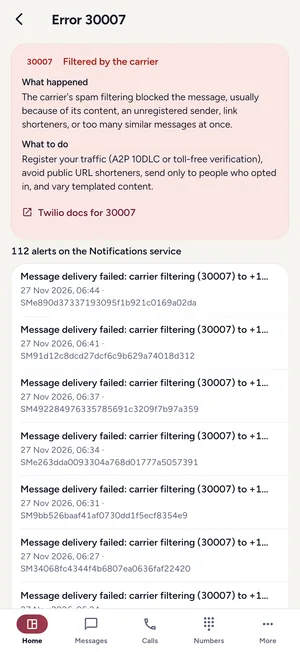
Switchmast explains 30007 in plain English, what happened and what to do, and lists the matching alerts underneath with their Message SIDs, the ones Twilio Support asks for. A rise in 30007s after a template change shows up on your phone the same morning, not at the end of the month.
Questions
What does Twilio error 30007 mean?
Message filtered: Twilio's filtering system or a wireless carrier blocked the message because it looked like spam or unwanted messaging, or broke a carrier rule. The message ends with status undelivered.
How do I fix error 30007?
Make sure your sender is registered (A2P 10DLC or toll-free verification), that every recipient opted in, and that the content matches your registered use case and Twilio's Messaging Policy. Avoid public link shorteners and misleading wording. If you believe the traffic complies, send Twilio Support three or more undelivered Message SIDs with 30007.
Is 30007 caused by the recipient blocking me?
No. A recipient who replied STOP produces error 21610. 30007 is filtering by Twilio or the carrier, usually based on the content, the sender's registration or the sending pattern.
Can one word trigger 30007?
Filtering looks at content, so wording can matter, but Twilio doesn't publish a list of banned words. Messages that don't match the use case you registered, or that look like phishing, are the usual problem.
Am I charged for messages that fail with 30007?
30007 messages end as undelivered. On Twilio's US SMS pricing page (as of 27 Nov 2026) the $0.001 failed message processing fee applies only to messages that end in the Failed status, so check your usage records for how each message was billed.
Sources
All read 27 November 2026.
- Twilio docs: Error 30007, Message filtered
- Twilio docs: Error 30004, Message blocked
- Twilio docs: Error 30892, public URL shorteners
- Twilio docs: What is A2P 10DLC? (registered traffic gets less filtering)
- Twilio: SMS pricing, United States (failed message processing fee)