 Switchmast
Twilio error 13227: Geo Permission configuration is not permitting call
Updated
13227 (Geo Permission configuration is not permitting call) means you placed an outbound call to a destination your Twilio account isn't enabled to call. Open Voice › Settings › Geo permissions in the Console, enable the country's low-risk ranges if you really need it, save and try again. Leave high-risk ranges off unless you must call them.
What Twilio says it means
Twilio's error reference names 13227 Geo Permission configuration is not permitting call, an application error in Programmable Voice. You tried to start an outbound phone call to a number that isn't enabled on your account: the user dialled a destination your application isn't set up to call.
Voice Dialing Geographic Permissions decide which countries, and which number ranges within each country, your account can call. They apply to Programmable Voice and Elastic SIP Trunking alike.
How Geo Permissions are split
| Range | What it covers | Twilio's advice |
|---|---|---|
| Low-Risk | Most mobile and landline numbers in a country. | Turn on only the countries you need. |
| High-Risk for toll fraud | Narrow ranges Twilio has linked to toll fraud (International Revenue Share Fraud). Twilio doesn't publish them and updates the list several times a month. | Most businesses never need these; keep them off. |
| High-Risk special services | Premium, shared-cost and special services numbers. Shown on the Geo Permissions page. | Enable only if your business must call them. |
How to check and fix it
- Confirm the number. Make sure the
Tonumber is correct and in E.164 format (+ and country code). A wrong country code sends the call somewhere you didn't mean. - Check the permission. In the Twilio Console, go to Voice › Settings › Geo permissions and find the country.
- Use the Phone Number Permission Check on that page to see whether the exact number falls in a high-risk range.
- Enable what you need. Tick Low-Risk for the country (and a high-risk range only if you must call it), then select Save.
- Or use the API.
GET https://voice.twilio.com/v1/DialingPermissions/Countries/{IsoCode}returnslow_risk_numbers_enabled,high_risk_special_numbers_enabledandhigh_risk_tollfraud_numbers_enabledfor a country. - Try the call again.
On a Trial account you can only call low-risk destinations, so a high-risk number keeps failing until you upgrade.
How to prevent it (and toll fraud)
Geo Permissions exist to protect you. Fraudsters run up calls to numbers that earn them money per minute, and Twilio says customers are responsible for all usage on their accounts. Its recommendations:
- Enable only the countries you need, low-risk ranges only, for click-to-call, 2FA, PBX and contact-centre use cases.
- Protect public forms that place calls with rate limits; they are a common target.
- Turn on two-factor sign-in and keep API keys private (see Twilio API keys).
- Set usage triggers on calls or minutes so a spike, such as a weekend surge, alerts you the same day.
Check per-minute rates before opening a new country: see how Twilio bills.
Related codes
- 21215 Geo Permission configuration is not permitting call: same name, another of the three calls blocked by Geo Permissions.
- 32205 SIP Trunking: Geo Permission configuration is not permitting call: the Elastic SIP Trunking version.
- 21408 Permission not enabled for the region: the SMS equivalent.
How Switchmast helps
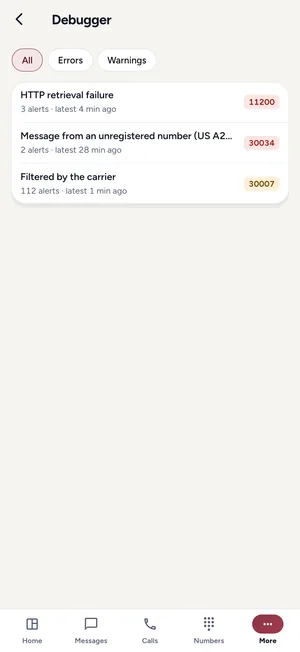
Twilio's advice for finding blocked calls is to search the Debugger for 13227. Switchmast puts the same Debugger alerts on your phone, and its Calls tab has a Failed filter, so you can see a blocked international call and which number it went to without opening a laptop.
Questions
What does Twilio error 13227 mean?
Geo Permission configuration is not permitting call: you tried to place an outbound call to a number your account isn't enabled to call. The fix is in your Voice Dialing Geographic Permissions.
How do I enable international calling in Twilio?
In the Twilio Console go to Voice › Settings › Geo permissions, select the country, tick Low-Risk (and High-Risk only if you truly need it) number ranges, and select Save.
Why can't my Twilio trial account call some countries?
Trial accounts can call 200+ countries and territories, but only low-risk destinations. Calls to high-risk number ranges are blocked until you upgrade and enable them.
Is 13227 the same as error 21408?
No. 21408 is the SMS version: the destination country is off in Messaging Geo Permissions. 13227 is for voice calls, controlled by Voice Geo Permissions, a separate setting.
Which other errors mean Geo Permissions blocked a call?
Twilio lists three warnings for calls blocked by Geo Permissions: 21215, 32205 and 13227. 32205 is the Elastic SIP Trunking version.
Sources
All read 27 November 2026.
- Twilio docs: Error 13227, Geo Permission configuration is not permitting call (read 27 Nov 2026)
- Twilio docs: Protect your account with Voice Dialing Geographic Permissions (read 27 Nov 2026)
- Twilio docs: Dialing Permissions, Countries resource (read 27 Nov 2026)
- Twilio docs: Error 21215 and Error 32205 (read 27 Nov 2026)