 Switchmast
Twilio error 21408: permission not enabled for the region
Updated
21408 means Twilio blocked the message because the destination country is disabled in your Messaging Geo Permissions, or Twilio doesn't support that destination on the channel you used. New accounts can only text their home country. Check the number's country code, then enable the country under Messaging › Settings › Geo Permissions if you really need it.
What Twilio says it means
Twilio's error reference names 21408 Message blocked: permissions disabled for the destination region, log type APPLICATION, level ERROR. It's a setting or policy block on your account, not a carrier failure, so retrying the same request gives the same result.
Geo Permissions are a list of countries your account is allowed to send SMS to. Twilio uses them to limit exposure to SMS pumping fraud, where bad actors trigger texts to expensive numbers they profit from, and recommends switching off countries you don't use.
Common causes, most likely first
- The country is disabled in Geo Permissions. By default a new account can only message its home country, based on the number verified at signup.
- The To number has the wrong country code. A US-style number sent with an extra digit, or a local number with the wrong prefix, can point at another country you haven't enabled. A badly formed number may give 21211 instead.
- A subaccount inherits a narrower list from its parent, or had inheritance turned off and a separate list set.
- Twilio doesn't support the destination on that channel. For WhatsApp and RCS that includes numbers starting with +98.
- Regulatory blocks. Twilio stopped delivering to recipients in Iran in March 2025, and in Syria and Cuba in September 2025. Geo Permissions can't change that.
How to check and fix it
- Find the failed messages. The API's error response or the Message resource carries the code 21408; in the Console, Monitor › Logs › Error Logs lists it with the request details. Note the To number of each one.
- Confirm the country. A free Lookup request returns the number in E.164 with its
country_code, so you can see which country Twilio thinks it is. - Open Geo Permissions. In the Console: Messaging › Settings › Geo Permissions. You need the Account Owner or Account Admin role.
- Enable the country only if your use case needs it, and save. Changes apply immediately. Countries Twilio labels High Risk for SMS pumping open a risk acknowledgement you must tick first.
- Check the destination's rules. Some countries need sender registration or restrict certain sender types or use cases, so enabling the country is not always enough for delivery.
- Subaccounts: if the error comes from a subaccount, check whether it inherits the parent's settings or has its own.
Geo Permissions can't be changed through the API. Every change is recorded in the Console's audit event logs (Monitor › Insights › Audit › Audit Event Logs), which helps when someone asks who switched a country on.
How to prevent it
- Decide your country list up front and enable it before launch, rather than after the first wave of 21408s.
- Keep the list short. Every enabled country you don't serve is a route for SMS pumping. Twilio's Geo Permissions guide also points to its SMS Pumping Protection and, for one-time codes, Verify Fraud Guard.
- Normalise numbers to E.164 on input so a wrong country code doesn't send traffic to a country you never meant to reach.
- Know the hard blocks. Don't retry traffic to Iran, Syria or Cuba expecting a settings change to fix it.
Related error codes
| Code | Meaning |
|---|---|
| 21211 | Invalid 'To' phone number: badly formatted or not a real number |
| 21606 | The From sender can't send to this number, for example a short code sending abroad |
| 21610 | The recipient opted out with STOP |
| 30007 | The message was sent but filtered by Twilio or the carrier |
How Switchmast helps
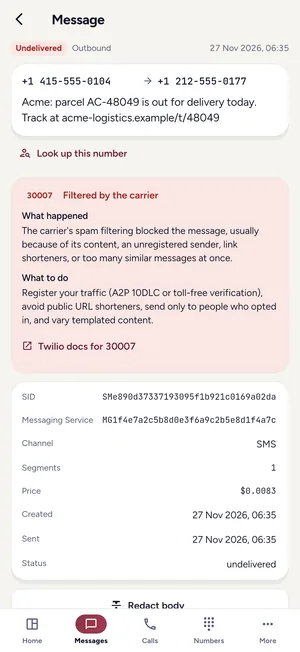
Open a failed message in Switchmast and 21408 is explained in plain English, with the Console path to Geo Permissions. Its delivery insights group failures by destination country, so a new market that's still switched off stands out. For other codes, see the Twilio error codes hub.
Questions
What does Twilio error 21408 mean?
Message blocked: permissions disabled for the destination region. Your account tried to message a country that is turned off in Messaging Geo Permissions, or one Twilio doesn't support for that channel.
How do I enable SMS to another country in Twilio?
In the Twilio Console, open Messaging › Settings › Geo Permissions, tick the country and save. Only Account Owner and Account Admin users can change it, and the change takes effect immediately. It can't be changed through the API.
Why can a new Twilio account only text one country?
By default, new accounts can message their home country, based on the phone number verified at signup. Other countries stay off until you enable them in Geo Permissions.
I enabled the country and still get 21408. Why?
Check the To number's country code first: a wrong prefix points the message at a different country. Twilio also doesn't deliver to some destinations at all, whatever your settings: it stopped delivering to Iran in March 2025 and to Syria and Cuba in September 2025.
Do subaccounts have their own Geo Permissions?
Subaccounts inherit the parent account's settings by default. An Owner or Admin can turn inheritance off and manage a subaccount's permissions separately.
Sources
- Twilio docs: Error 21408 (read 27 Nov 2026)
- Twilio docs: SMS Geo Permissions (defaults, roles, subaccounts, High Risk, audit logs; read 27 Nov 2026)
- Twilio docs: Lookup v2 API (read 27 Nov 2026)
- Twilio docs: Debugging tools (read 27 Nov 2026)