 Switchmast
How to send and receive SMS with Twilio
Updated
To send an SMS with Twilio, POST to the Messages API with To, a sender (From or MessagingServiceSid) and a Body. To receive one, point your number's "A message comes in" webhook at your server and reply with TwiML. For US numbers, register for A2P 10DLC or verify your toll-free number first.
Before you send: US registration
If any of your recipients are in the US, sort this out first. Twilio's quickstart states the rules plainly:
- Local (10DLC) numbers need A2P 10DLC registration to text US mobiles. That applies to everyone, hobbyists included. Unregistered 10DLC traffic pays extra carrier fees and is blocked with error 30034.
- Toll-free numbers need toll-free verification to text US and Canadian mobiles.
- Short codes and toll-free numbers aren't part of the 10DLC system, so they don't need 10DLC registration.
Sending to other countries needs that country switched on in Messaging Geo Permissions; otherwise Twilio refuses the request with error 21408. New accounts can only text the country of the phone number verified at sign-up. Leave countries you don't serve switched off: it is the first defence against SMS pumping fraud.
Send an SMS with curl
The endpoint is POST https://api.twilio.com/2010-04-01/Accounts/{AccountSid}/Messages.json. Authenticate with an API key SID and secret (or your Account SID and Auth Token). Numbers are in E.164 format.
curl -X POST "https://api.twilio.com/2010-04-01/Accounts/$TWILIO_ACCOUNT_SID/Messages.json" \
  --data-urlencode "To=+15551230000" \
  --data-urlencode "From=+15551230001" \
  --data-urlencode "Body=Your order has shipped." \
  --data-urlencode "StatusCallback=https://example.com/sms-status" \
  -u "$TWILIO_API_KEY:$TWILIO_API_SECRET"
The response is the new Message resource. Keep its sid (it starts with SM): you need it to look the message up later and Twilio Support asks for it when something goes wrong.
Send an SMS with Python
Twilio publishes helper libraries for Python, Node.js, C#, Java, Go, PHP and Ruby. In Python (pip install twilio):
import os
from twilio.rest import Client

client = Client(os.environ["TWILIO_API_KEY"],
                os.environ["TWILIO_API_SECRET"],
                os.environ["TWILIO_ACCOUNT_SID"])

message = client.messages.create(
    to="+15551230000",
    from_="+15551230001",
    body="Your order has shipped.",
    status_callback="https://example.com/sms-status",
)
print(message.sid, message.status)
Note from_ with an underscore: from is a reserved word in Python. To send a picture, add media_url=["https://…"] (up to ten URLs); the sender must be MMS-capable.
From or MessagingServiceSid?
From | MessagingServiceSid | |
|---|---|---|
| Who picks the sender | You: one number, short code or sender ID | Twilio, from the service's sender pool |
| First status | queued | accepted (while Twilio picks a sender) |
| Scheduling, link shortening | No | Yes |
| Sticky Sender, Smart Encoding, Geomatch | No | Yes |
| Status callback | Pass StatusCallback on each message | Set once on the service, or per message |
You can send both. Then From must be a sender in that service's pool, and the message starts as queued. A2P 10DLC campaigns are attached to Messaging Services, so most US senders end up using one anyway. See Twilio Messaging Services for every setting.
Status callbacks and the status lifecycle
The API answers as soon as Twilio accepts the request, long before the text reaches a phone. To learn what happened next, give Twilio a StatusCallback URL. Twilio sends it a form-encoded POST each time the status changes, with MessageSid, MessageStatus and, for failed or undelivered, an ErrorCode. Return HTTP 200.
| Status | Meaning |
|---|---|
accepted | Messaging Service only: Twilio is choosing a sender |
scheduled | Messaging Service only: waiting for its send time |
queued | Waiting to go out from a specific sender |
sending | Twilio is handing it to the carrier |
sent | The carrier accepted it |
delivered | The carrier (and, where available, the handset) confirmed delivery |
undelivered | A delivery receipt said it didn't arrive |
failed | It couldn't be sent at all, for example a full queue or a suspended account |
canceled | A scheduled message was cancelled |
read | RCS and WhatsApp only, with read receipts on |
Two things trip people up. First, callbacks can arrive out of order: Twilio says there is no guarantee they reach you in the order sent, so never let a late sent overwrite delivered. Second, Twilio adds callback parameters without notice, so ignore fields you don't recognise. The callback URL needs a valid hostname without underscores. Failed messages also carry a $0.001 processing fee in the US (SMS pricing, as of 27 Nov 2026).
Receive SMS and reply
Inbound texts go to the webhook on the number:
- In the Console, open Phone Numbers and click your number.
- Under Messaging, set A message comes in to Webhook with your URL, method POST.
- Optionally set Primary handler fails to a backup URL. Twilio uses it if your main URL errors or doesn't answer within 15 seconds.
Twilio sends MessageSid, From, To, Body, NumMedia, NumSegments, MediaUrl0 and so on for attachments, and city or country fields when it can look them up. Your server answers with TwiML:
<Response>
    <Message>Thanks, we got your message.</Message>
</Response>
In Python with Flask:
from flask import Flask, request
from twilio.twiml.messaging_response import MessagingResponse

app = Flask(__name__)

@app.route("/sms", methods=["POST"])
def sms_reply():
    body = request.values.get("Body", "").strip().lower()
    resp = MessagingResponse()
    if body == "hours":
        resp.message("We're open 9am to 5pm, Monday to Friday.")
    return str(resp)
An empty <Response/> is fine: Twilio takes no action, so you can store messages without replying. Validate the X-Twilio-Signature header with your helper library's request validator so strangers can't post fake messages to your endpoint. If the number is in a Messaging Service, the service's inbound setting decides whether its own webhook or the number's is used.
A webhook that times out or returns an error shows up as error 11200 in the Debugger.
Test without sending or paying
Twilio's test credentials (Console, Admin > Account management > API keys & tokens) accept Messages requests without sending anything or charging you. They don't support MessagingServiceSid and don't trigger status callbacks. Pair them with magic numbers:
| Number | Use as | Result |
|---|---|---|
+15005550006 | From | Passes validation |
+15005550001 | From | Invalid number, error 21212 |
+15005550008 | From | Queue full, error 21611 |
+15005550001 | To | Invalid number, error 21211 |
+15005550003 | To | No international permission, error 21408 |
+15005550004 | To | Recipient blocked you, error 21610 |
+15005550009 | To | Can't receive SMS, error 21614 |
For a real end-to-end test, Twilio's quickstart sends to its Virtual Phone at +18777804236, which you can watch in the Console.
Common mistakes
- Treating the API response as delivery.
queuedoracceptedonly means Twilio took the request. Use status callbacks. - Sending from an unregistered US number. Expect 30034, or 30007 filtering if the content doesn't match the campaign.
- Long messages and emoji. One emoji drops a segment from 160 to 70 characters, and each segment is billed.
- Texting landlines. Check with Lookup first.
Send and reply from your phone
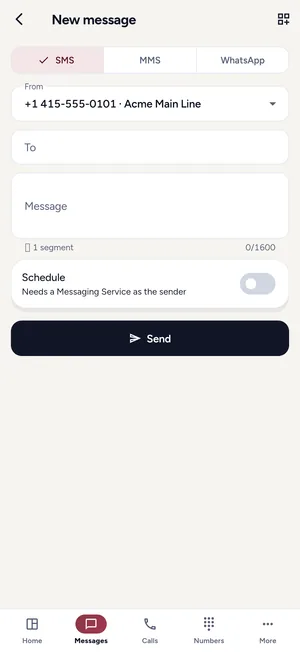
Switchmast sends through the same Messages API from your iPhone: pick one of your numbers or a Messaging Service, type, and send. Every message then shows its status, and failures show the error code in plain English. Replies land in an inbox built from your message log, so you can answer a customer without opening a laptop.
Questions
What is the Twilio SMS API endpoint?
POST https://api.twilio.com/2010-04-01/Accounts/{AccountSid}/Messages.json with To, a sender (From or MessagingServiceSid) and content (Body, MediaUrl or ContentSid). It returns the new Message resource with its SID and status.
Should I use From or MessagingServiceSid?
From sends from one number you choose. MessagingServiceSid lets Twilio pick a sender from the service's pool and unlocks features such as Sticky Sender, Smart Encoding and scheduling. If you send both, the From number must be in that service's sender pool.
How do I receive SMS with Twilio?
Set the number's "A message comes in" webhook to a URL on your server. Twilio sends the message's From, To and Body there and expects TwiML back: a Message verb to reply, or an empty Response to receive without replying.
Can I test Twilio SMS for free?
Yes. Test credentials accept Messages requests without sending anything or charging you, and magic numbers such as +15005550006 (From) let you simulate success and common errors. Test requests don't trigger status callbacks.
Do I need to register before texting US numbers?
Yes. Twilio's docs say A2P 10DLC registration is required to text US mobiles from local numbers, and toll-free verification is required to text US and Canadian mobiles from toll-free numbers.
Sources
- Twilio docs: Message resource (parameters, statuses, From vs MessagingServiceSid) (read 27 Nov 2026)
- Twilio docs: Track the message status of outbound messages (read 27 Nov 2026)
- Twilio docs: Receive and reply to SMS in Python (read 27 Nov 2026)
- Twilio docs: Messaging webhook request (inbound parameters) (read 27 Nov 2026)
- Twilio docs: Test credentials (magic numbers) (read 27 Nov 2026)
- Twilio docs: Messaging quickstart (US registration, Virtual Phone) (read 27 Nov 2026)
- Twilio docs: What is A2P 10DLC? (read 27 Nov 2026)
- Twilio docs: SMS Geo Permissions (read 27 Nov 2026)
- Twilio: US SMS pricing (failed message fee) (read 27 Nov 2026)