 Switchmast
Twilio call recording: how to record, store and delete calls
Updated
Twilio records calls three main ways: <Dial record> for connected calls, <Record> for voicemail, and the Recordings API to start or stop recording a live call. In the US, as of 27 Nov 2026, recording costs $0.0025 a minute plus $0.0005 per stored minute a month, until you delete it.
Which method to use
| You want to record | Use |
|---|---|
| A call forwarded or connected to someone | <Dial record="…"> |
| A message the caller leaves (voicemail) | <Record> |
| Part of a call, on demand (start, pause, resume, stop) | Recordings API on the live call, or <Start><Recording> |
| An outbound call your code places | Record=true when creating the call |
| A conference | <Conference record="…"> |
| Calls on a SIP trunk | The trunk's recording setting in the Console (see SIP trunking) |
| A Studio flow | The Call Recording or Record Voicemail widget, or Record on Connect Call To |
Record a connected call with <Dial record>
This is the usual choice for call centres and forwarded calls. Add record to <Dial>:
<Response>
  <Say>This call may be recorded.</Say>
  <Dial record="record-from-answer-dual"
        recordingStatusCallback="https://example.com/recording-ready">
    +15558675310
  </Dial>
</Response>
The values:
do-not-record(default)record-from-answerorrecord-from-ringing: mono, both parties mixed togetherrecord-from-answer-dualorrecord-from-ringing-dual: two channels, one per party, which makes transcription and quality review easier
recordingStatusCallback is called when the file is ready (the completed event by default). trim="trim-silence" removes leading and trailing silence; the default for <Dial> is do-not-trim.
Take a voicemail with <Record>
<Record> records the caller's voice and sends you the URL of the file.
<Response>
  <Say>Please leave a message after the beep.</Say>
  <Record action="https://example.com/handle-recording" maxLength="120" finishOnKey="#" />
  <Say>We didn't get a recording. Goodbye.</Say>
</Response>
Defaults worth knowing: recording stops after 5 seconds of silence (timeout), any key ends it unless you set finishOnKey, maxLength is 3,600 seconds, a beep plays first, and silence is trimmed. When it ends, Twilio requests action with RecordingUrl, RecordingDuration and Digits. The file may not be ready at that moment; use recordingStatusCallback if you need the finished file. <Record> recordings are single-channel.
Start recording a live call with the API
To record on demand, for example when an agent clicks "Record", POST to the call's Recordings list:
curl -X POST "https://api.twilio.com/2010-04-01/Accounts/$ACCOUNT_SID/Calls/CAxxxxxxxx/Recordings.json" \
  --data-urlencode "RecordingChannels=dual" \
  --data-urlencode "RecordingStatusCallback=https://example.com/recording-ready" \
  -u "$API_KEY_SID:$API_KEY_SECRET"
The same resource lets you pause, resume and stop the recording. Status moves through in-progress, paused, stopped, processing and completed. Authenticate with an API key rather than your Auth Token where you can.
Getting the audio
- Add
.mp3(32 kbps) or.wav(128 kbps) to the recording's URI:…/Recordings/REXXXX.mp3. - Media URLs require HTTP Basic authentication. Use an API key SID as the username and its secret as the password.
- Only
completedrecordings stored at Twilio can be fetched; anything else returns Not Found. If you send recordings to external storage, they aren't available at Twilio's URL. - Call and conference recordings are stored dual-channel by default. Asking for two channels on a
<Record>recording returns a 400; retry withRequestedChannels=1. - Twilio offers Call Recording Encryption; encrypted recordings carry
encryption_detailsfor decryption.
Pricing, as published (US)
From Twilio's US Programmable Voice pricing page, read 27 Nov 2026. Prices in USD.
| Item | Price |
|---|---|
| Call recording | $0.0025 per minute |
| Storage, first 5 million minutes | $0.00050 per minute per month |
| Storage, next 10 million minutes | $0.00025 per minute per month |
| Storage, above 15 million minutes | $0.00015 per minute per month |
| Transcription of a call recording | $0.0500 per minute |
The page lists no free storage allowance. Recording is charged on top of the call itself; see Twilio voice pricing. Elastic SIP Trunking lists the same $0.0025 per minute to record and $0.0005 per minute per month to store.
Worked example (US, 27 Nov 2026 prices): you record 10,000 minutes of calls in a month. Recording costs 10,000 × $0.0025 = $25.00. Keeping those minutes costs 10,000 × $0.0005 = $5.00 every month you keep them. After a year of the same volume you're storing 120,000 minutes, or $60.00 a month in storage alone. Deleting what you don't need keeps that line flat.
Consent and recording laws
Whether you may record a call depends on where each person on it is, and the rules differ between countries and, in the US, between states. Twilio's docs say the use of recording is subject to the same obligations as its recording features in general, and that PCI (card payment) and HIPAA (health) workflows need extra review. This page isn't legal advice: check the law where your callers are, tell callers before you record (a <Say> before <Dial>, as in the example above), and keep only what you need.
Deleting recordings
curl -X DELETE "https://api.twilio.com/2010-04-01/Accounts/$ACCOUNT_SID/Recordings/REXXXX.json" \
-u "$API_KEY_SID:$API_KEY_SECRET"- A successful delete returns HTTP 204 with no body, and storage billing for those minutes stops.
- Only
completedrecordings can be deleted. - The audio can't be recovered. The metadata is kept for 40 days (status
deleted) and can be listed withIncludeSoftDeleted. - For many recordings at once, use bulk deletion in the Console, or list recordings by date and delete them in a script.
Common mistakes
- Fetching the file too early.
RecordingUrlin the<Record>action can arrive before the file exists. Wait for the recording status callback. - Linking raw media URLs in a browser. They need Basic auth, so download server-side and serve the file yourself.
- Never deleting. Storage is charged monthly per stored minute, forever.
- Recording mono when you'll transcribe. Dual channel keeps each speaker separate.
- Recording card numbers. Twilio's docs say PCI workflows need extra review before you record them. Studio's Capture Payments widget is built for taking card details instead.
Listening to recordings on your phone
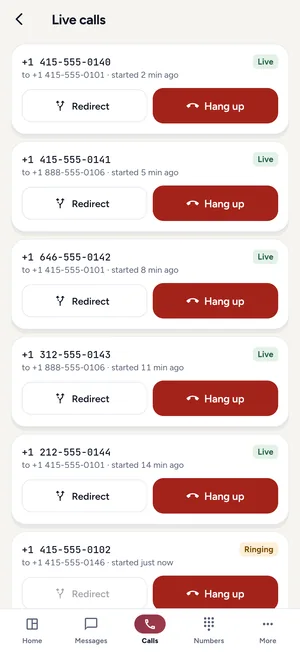
In Switchmast, a call's detail screen lists its recordings and plays them in the app, with scrubbing and 1.5× and 2× speed. The audio is downloaded with your key and kept only while the player is open. Playback is free. For calls still in progress, the Live calls screen can hang up or redirect a call to new TwiML, for example one that adds a recording notice.
Questions
How do I record a call with Twilio?
For a forwarded or connected call, add record="record-from-answer-dual" to <Dial>. For a voicemail, use <Record>. To start recording a call already in progress, POST to the call's Recordings endpoint in the REST API.
How much does Twilio call recording cost?
In the US, as of 27 Nov 2026, Twilio lists $0.0025 per minute to record and $0.0005 per minute per month to store (for the first 5 million stored minutes). Transcription is listed at $0.0500 per minute.
How long does Twilio keep call recordings?
Twilio's docs don't give an automatic expiry: recordings stay, and keep incurring storage charges, until you delete them. After deletion the audio can't be recovered and the metadata is kept for 40 days.
How do I download a Twilio recording?
Add .mp3 (32 kbps) or .wav (128 kbps) to the recording's URI. Media URLs need HTTP Basic authentication with an API key SID and secret, and only completed recordings stored at Twilio can be fetched.
Do I need consent to record calls?
Usually, yes, but the rules depend on where each party is. Twilio's docs say recording is subject to legal obligations and that PCI and HIPAA workflows need extra review. Get legal advice and tell callers before recording.
Sources
Prices in USD for the United States.
- Twilio docs: Recordings resource (ways to record, statuses, media formats, authentication, channels, deletion) (read 27 Nov 2026)
- Twilio docs: TwiML <Dial> (record values, recordingStatusCallback, trim) (read 27 Nov 2026)
- Twilio docs: TwiML <Record> (attributes, defaults, action parameters) (read 27 Nov 2026)
- Twilio docs: Call resource (Record parameter, recording obligations, PCI and HIPAA) (read 27 Nov 2026)
- Twilio: Voice pricing, United States (recording, storage tiers, transcription) (read 27 Nov 2026)
- Twilio: Elastic SIP Trunking pricing, United States (read 27 Nov 2026)
- Twilio docs: Studio widget library (read 27 Nov 2026)