 Switchmast
Twilio Studio: flows, widgets and a working IVR
Updated
Twilio Studio is a drag-and-drop builder for call and message flows such as phone menus (IVRs), chatbots and call forwarding. A flow starts at a trigger, passes through widgets and runs once per caller as an execution. As of 27 Nov 2026 the first 1,000 executions a month are free, then $0.0025 each.
How a Studio flow works
Twilio describes Studio as "a low-code/no-code visual builder" for communication workflows. You draw a flow on a canvas: a Trigger at the top, then widgets joined by transitions. Each widget does one thing (say a message, gather digits, call someone, call your API) and has named exits such as "User pressed keys" or "No input". You connect each exit to the next widget.
The Trigger widget has five starting points:
- Incoming Message: an SMS or WhatsApp message to a number connected to the flow.
- Incoming Call: a voice call to that number.
- Incoming Conversation (classic Conversations).
- REST API: your code starts an execution, for example to place an outbound reminder call.
- Subflow: another flow calls this one.
Message and REST API triggers allow one active execution per contact at a time.
The widgets
From Twilio's widget library, grouped as Twilio groups them:
| Group | Widgets |
|---|---|
| Flow control | Trigger, Split Based On…, Set Variables |
| Voice | Say/Play, Gather Input On Call, Connect Call To, Make Outgoing Call, Record Voicemail, Call Recording, Enqueue Call, Capture Payments, Fork Stream, Connect Virtual Agent |
| Messaging | Send Message, Send & Wait For Reply |
| Tools and code | Run Function, HTTP Request, TwiML Redirect |
| Other products | Send to Flex |
Widgets read data from earlier steps with Liquid variables, for example {{widgets.gather_1.Digits}} or {{trigger.call.From}}. Send to Flex hands the contact to an agent in Twilio Flex.
Example: a two-option phone menu (IVR)
This follows Twilio's IVR tutorial: callers press 1 or say "sales" for Sales, 2 or "support" for Support.
- Create the flow. In the Console open Studio, create a flow and start from scratch. The canvas opens with the Trigger widget.
- Add the menu. Drag a Gather Input On Call widget onto the canvas and connect the Trigger's Incoming Call exit to it. Name it
greet_caller. Set Say/Play to "Say a message" and enter: "Thanks for calling Acme. Press 1 or say sales for sales. Press 2 or say support for support." - Route the answer. Add a Split Based On… widget and connect both the User pressed keys and User said something exits to it (the widget only listens for keypad input if User pressed keys is connected). Test the variable
widgets.greet_caller.Digitsfor keypresses; a second split onwidgets.greet_caller.SpeechResulthandles speech. - Add conditions. On the split, add "Equal to 1" and "Equal to 2" (or "Contains sales" / "Contains support" for speech).
- Connect the calls. Add two Connect Call To widgets, one for each team's number in E.164 format (+15558675310), and wire each condition to its widget.
- Handle no input. Wire the gather's No input exit and the split's No condition matches exit back to a Say/Play that apologises and then returns to the menu, or to a voicemail. Don't loop forever: an execution stops if one widget runs 10 times in a row.
- Publish, then connect the number: open the number's configuration, set "A call comes in" to Studio Flow, choose the flow and save. See Twilio phone numbers.
The stop key for gathering (# by default) isn't included in Digits: a caller who types 1# sends 1.
Studio also ships a ready-made call forwarding template. For forwarding without a menu, see Twilio call forwarding.
Drafts, publishing and test users
Edits are saved as a draft. Live callers keep getting the last published version until you click Publish. To try a draft safely, add your own number (E.164, comma-separated for several) under Test users in the Trigger widget: when a test user contacts the flow's number, they get the latest draft instead.
Executions and debugging
An execution is one person's run through a flow. Its status is active or ended. Each widget it passes through is a step, and the context holds everything the flow has collected so far: trigger data, widget results and variables.
To find out why a caller ended up in the wrong place:
- Open the flow's executions log in Studio and find the run by the caller's number and time.
- Read the steps in order. Each step shows the widget and which transition it took, so you can see exactly where the call went wrong.
- Open the context to check the values: did
Digitscontain what you expected? Did an HTTP Request return the JSON you thought? - Fix the flow, test it as a test user, then publish.
Through the API, executions live at studio.twilio.com/v2/Flows/{FlowSid}/Executions, with /Steps and /Context under each one. A stuck execution, such as a chatbot waiting for a reply that will never come, can be ended with a POST of Status=ended; ending one that has already ended returns 409.
Limits worth knowing
- Execution and step data is kept for 30 days after the execution starts. Use Event Streams to keep it longer.
- An execution ends automatically after 30 days or after 1,000 steps.
- An execution stops if the same widget runs 10 times in a row.
- HTTP Request and Run Function calls time out after 10 seconds.
- A flow can hold up to 2,000 widgets, including subflows.
When a widget calls your server and it fails, Twilio usually logs an error in the Debugger; our Twilio error codes pages explain the common ones.
Studio pricing, as published
From Twilio's Serverless pricing page, read 27 Nov 2026 (USD, no country stated):
| Item | Price |
|---|---|
| First 1,000 flow executions each month | Free |
| Each execution after that | $0.0025 |
| Enterprise | Contact sales |
The Studio fee doesn't include the services the flow uses. An IVR call that is forwarded is billed as voice minutes too, and a chatbot pays for each SMS. Example: 5,000 inbound calls through an IVR in a month is 4,000 paid executions × $0.0025 = $10.00 for Studio, plus the calls themselves. See Twilio voice pricing and Twilio pricing.
Studio executions on your phone
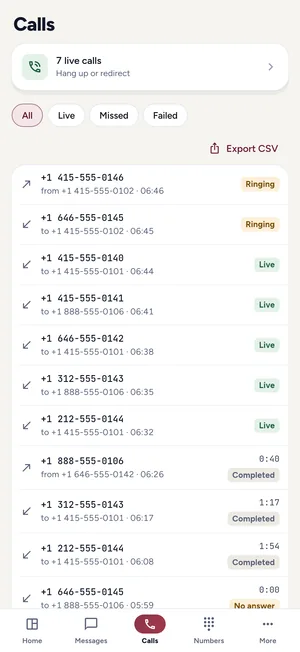
Switchmast's Build & operate section lists your Studio flows and their executions. Open one to read its steps (which widget, which transition) and its context, and end a stuck execution with Pro, behind a confirm and Face ID. Call and message detail screens link to the executions for that contact, so from a call in the log you can jump straight to the flow run that handled it.
Questions
How much does Twilio Studio cost?
As of 27 Nov 2026 Twilio's pricing page lists the first 1,000 flow executions each month free, then $0.0025 per execution, pay as you go. Calls, messages and other Twilio services the flow uses are billed separately.
What is a Studio flow execution?
One person's run through a flow, such as one inbound call or one SMS conversation. It is active while the person is in the flow and ends when they hang up, stop replying or the flow finishes.
How do I build an IVR in Twilio Studio?
Start a flow from the Incoming Call trigger, add a Gather Input on Call widget with your menu prompt, route on its Digits or SpeechResult with Split Based On, send each branch to a Connect Call To widget, publish, then select the flow in your number's voice configuration.
How long does Twilio keep Studio execution logs?
Execution and step data is kept for 30 days after an execution starts. To keep it longer, subscribe to Studio events with Event Streams and store them yourself.
Why did my Studio execution end on its own?
Executions end automatically after 30 days, after 1,000 steps, or if one widget runs 10 times in a row. Loops back to the same widget are the usual cause of the last two.
Sources
Prices in USD, as Twilio lists them.
- Twilio docs: Studio (what Studio is, underlying services billed separately) (read 27 Nov 2026)
- Twilio docs: Studio user guide (triggers, publishing, test users, 30-day retention) (read 27 Nov 2026)
- Twilio docs: Studio widget library (read 27 Nov 2026)
- Twilio docs: Gather Input On Call (read 27 Nov 2026)
- Twilio docs: Build an IVR with Studio (read 27 Nov 2026)
- Twilio docs: Studio Execution resource (statuses, ending an execution, context) (read 27 Nov 2026)
- Twilio docs: Studio FAQ (limits) (read 27 Nov 2026)
- Twilio: Serverless pricing (Studio executions) (read 27 Nov 2026)